*Or: how I spent a Friday morning arguing with a percent sign.*
I upgraded, and my SES bounces and complaints stopped reaching Mautic. No error on screen, nothing in the logs, just Amazon knocking on my door every few minutes and Mautic answering: **403 Forbidden**.
Here's what 1.0.40 does, why it's a good thing, how to set it up properly, and the two gotchas I hit on the way (one of which I've sent upstream as a pull request, so please go and give it some love 👇).
1. What does 1.0.40 actually do?
Short version: **Mautic now checks who's calling before it believes what they say.**
Amazon SES doesn't talk to Mautic directly about bounces and complaints. It tells **Amazon SNS** (Simple Notification Service), and SNS then POSTs a JSON message to your Mautic callback URL:
https://your-mautic.example.com/mailer/callback
Mautic reads that message and says "right, `jean-puc@starfleet.com` hard-bounced, mark her as Do Not Contact."
Before 1.0.40, the plugin more or less took that message at face value. From the changelog:
**Security:** Authenticate SNS webhook signatures with AWS's maintained validator and require an exact allowed topic ARN before processing feedback.
So every incoming callback now has to pass **two checks**:
1. Is it from my topic? The `TopicArn` in the message must exactly match a topic you've allowed. No allowed topic configured? Then nothing gets in. The plugin *fails closed*.
2. Is it really from AWS? The message signature is verified with AWS's official `aws-php-sns-message-validator` library: it downloads Amazon's signing certificate and checks that nobody has changed the message.
If either check fails, you get: `403 Invalid SNS notification`. 🚫
2. Why should you care about the signature?
Because `/mailer/callback` is a public URL. Anyone on the internet can POST to it. Your mum, your competitor, a bored bot in a data centre somewhere.
Without signature verification, that URL is basically a "please unsubscribe my contacts" button with no lock on it. Someone who knows (or guesses) your Mautic URL could send a fake "bounce" or "complaint" for every address on your list, and Mautic would mark them all Do Not Contact. That's your newsletter gone, your segments empty, and a very fun Monday for you.
With 1.0.40:
Only AWS can produce a valid signature. It's signed with Amazon's private key, and the plugin checks it against Amazon's public certificate.
Only *your* topic is accepted. Even a real, correctly signed SNS message from someone else's AWS account gets rejected, because its topic ARN isn't on your list.
Changed messages fail. Change a single character and the signature no longer matches.
This is the kind of security work nobody gets a round of applause for, so: thank you to the maintainer and contributors. 👏 Now let's make it actually work.
3. Setting it up in Mautic (and finding that ARN)
Step 1: Find your SNS topic ARN
An ARN (Amazon Resource Name) is Amazon's way of giving everything a very long, very colon-heavy name. Yours looks like this:
arn:aws:sns:eu-west-1:123456789012:my-mautic-feedback
└─region─┘ └─account──┘ └──topic name───┘
To find it:
1. Open the Amazon SNS console. ⚠️ Make sure you're in the right region (top right). Your topic lives in the same region as your SES setup.
2. Go to Topics and click the topic that receives your SES feedback.
3. The ARN is right there under Details. Copy it.
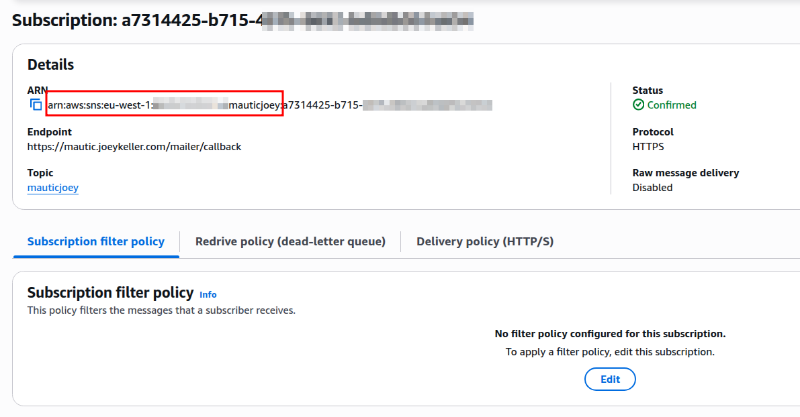
Not sure which topic SES uses? Go to Amazon SES → Identities → (your domain) → Notifications. It shows which SNS topic receives bounces and complaints.
While you're on the topic page, check two more things:
- Under Subscriptions, your `https://…/mailer/callback` endpoint should say **Confirmed**. If it says Pending confirmation, click it and choose Request confirmation once everything below is fixed.
- Raw message delivery must be OFF for that subscription. The signature is part of the SNS "envelope" around the message. With raw delivery on, Mautic receives just the SES JSON, with no signature to check.
Step 2: Tell Mautic which topic to trust
Go to **Settings → Configuration → Email Settings** and add `sns_topic_arn` to your DSN:
mautic+ses+api://ACCESS_KEY:SECRET_KEY@default?region=eu-west-1&sns_topic_arn=arn:aws:sns:eu-west-1:123456789012:my-mautic-feedback
In the DSN options that means one extra row:
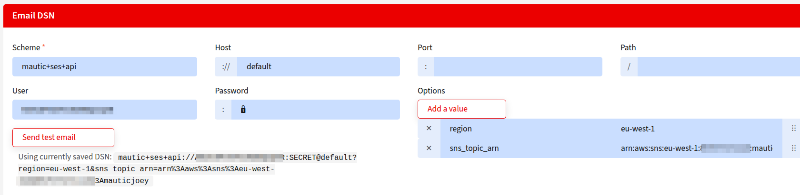
Got several topics (multiple regions, multiple identities)? Add them as a list in `config/local.php` instead:
php
'amazon_ses_sns_topic_arns' => [
    'arn:aws:sns:eu-west-1:123456789012:my-mautic-feedback',
    'arn:aws:sns:us-east-1:123456789012:my-other-feedback',
],
Note: if `sns_topic_arn` is set in the DSN, it wins, and the `local.php` list is ignored.
Clear your cache, and you're done!
…unless you're me. Which brings us to the gotchas. 🙃
4. Gotcha #1: the update needs a package it doesn't bring along
Here's what caught me first. The signature check uses an AWS library, **`aws/aws-php-sns-message-validator`**. The plugin *lists* it in its own `composer.json`… but if you installed the plugin the classic way (download the zip, or `git clone` into `plugins/`), **that file is never read by Composer**. Your Mautic's `vendor/` folder simply doesn't have the library.
And the main AWS SDK that Mautic already ships with? It only *suggests* that library. It doesn't install it.
So what happens when SNS knocks?
1. The plugin tries to create an `Aws\Sns\Message`…
2. PHP says "class not found"…
3. The plugin catches that error (it catches *everything* there), treats it as "signature invalid", and returns **403**.
4. The warning it logs is only a *warning*, and Mautic's production log only writes **errors**. So your logs show… nothing. 🕵️
Every single SNS message fails, even perfectly genuine ones. Including the subscription confirmation. So the update doesn't work on its own.
### Check whether you're affected
From your Mautic root, run as your web server user:
sudo -u www-data php -r 'require "vendor/autoload.php"; var_dump(class_exists("Aws\\Sns\\MessageValidator"));'
- `bool(true)` → you're fine, skip ahead.
- `bool(false)` → keep reading.
### The fix, and the version trap inside it
The plugin asks for `^1.10` of the validator. But version 1.10 needs `psr/http-message` **2.x**, and Mautic 5 ships with **1.1**. Composer will (rightly) refuse. You *could* force it with `-W`, but that upgrades a library that Mautic's own HTTP code relies on. Please don't.
Version **1.9.x** has exactly the same `Message` / `MessageValidator` classes the plugin uses and works fine with Mautic 5. Check what you have first:
composer show psr/http-message
If it's **1.x** (Mautic 5), install the 1.9 line:
composer require 'aws/aws-php-sns-message-validator:1.9.*' --dry-run   # look first!
composer require 'aws/aws-php-sns-message-validator:1.9.*'
If it's already **2.x**, the plugin's own `^1.10` is fine.
⚠️ Before you hit Enter: back up two files
On a `mautic/recommended-project` install, any `composer require` also runs Mautic's Composer scripts. That means:
- Scaffolding puts back the stock `docroot/index.php` and `docroot/.htaccess`. If you've customised those (I had a `$_SERVER['HTTPS'] = 'on';` line in `index.php` because TLS is handled by a proxy in front of Apache), **your changes are gone** and you get a lovely redirect loop. Ask me how I know. 😅
- `npm ci` wipes and reinstalls `node_modules`. If npm's cache folder isn't writable for your web user, it fails halfway and leaves `node_modules` nearly empty. Your live site keeps working (it serves prebuilt assets), but fix it before you ever rebuild assets.
So:
cp -p composer.json composer.json.bak
cp -p composer.lock composer.lock.bak
cp -p docroot/index.php docroot/index.php.bak
cp -p docroot/.htaccess docroot/.htaccess.bak
Then install, compare `index.php` / `.htaccess` with your backups, clear the cache and reload Apache.
Want to stop Composer overwriting those files in future? List them under `extra.mautic-scaffold.file-mapping` as `false` in your root `composer.json`.
---
## 5. Gotcha #2: the percent sign that broke everything 🐛
With the validator installed, I set my topic ARN in the **Email Settings** screen exactly as the README says… and still got 403.
Here's why. Mautic stores your DSN in `config/local.php`. Two things happen to it on the way:
1. The DSN option gets **URL-encoded**: every `:` becomes `%3A`.
2. Then Mautic **escapes every `%` as `%%`**, so Symfony doesn't mistake it for a `%parameter%` placeholder.
So your innocent ARN ends up stored like this:
sns_topic_arn=arn%%3Aaws%%3Asns%%3Aeu-west-1%%3A123456789012%%3Amy-mautic-feedback
Mautic core knows about this. When it passes the DSN to the mailer that *sends* your emails, it turns every `%%` back into `%` first. That's why sending works and `region` works.
But the SES plugin's **callback** code reads the raw setting straight from Mautic's config, *without* undoing the `%%`. Symfony then decodes the doubled percent signs into this monster:
arn%:aws%:sns%:eu-west-1%:123456789012%:my-mautic-feedback
The plugin compares *that* with the real ARN in the SNS message, and it doesn't match. **403. Every time.** Even with a perfect signature. 🤦
The fix is one line
// EventSubscriber/CallbackSubscriber.php
- $dsn = Dsn::fromString($this->coreParametersHelper->get('mailer_dsn'));
+ $dsn = Dsn::fromString(str_replace('%%', '%', (string) $this->coreParametersHelper->get('mailer_dsn')));
That's exactly what Mautic core does for the mailer, so the callback now sees the same DSN the mailer sees.
I've tested it with the ARN stored three ways: plain, URL-encoded, and Mautic's `%%3A` form. All three now match. I've sent it upstream:
👉 [PR #158: Unescape %% in mailer_dsn before parsing it in CallbackSubscriber](https://github.com/pm-pmaas/etailors_amazon_ses/pull/158)
Please give it a 👍 or a "works for me" comment** so it gets merged and released. Once it's in, the setup from section 3 works exactly as documented. 🙏
### Until it's merged, pick one workaround
Use the `local.php` list (`amazon_ses_sns_topic_arns`) and leave `sns_topic_arn` out of the DSN. That path never goes through the `%%` escaping.
Or edit `config/local.php` by hand and put the ARN in the DSN with **plain colons**. This works, but the next time anyone saves the Email Settings screen, Mautic re-encodes it and you're back to 403s.
Or apply the one-line patch above to your copy of the plugin. Just remember a plugin update will overwrite it until the PR is released.
TL;DR checklist ✅
[ ] Plugin updated to **1.0.40**
[ ] `class_exists("Aws\\Sns\\MessageValidator")` returns **true** (otherwise `composer require 'aws/aws-php-sns-message-validator:1.9.*'` on Mautic 5, after backing up `index.php` and `.htaccess`!)
[ ] Topic ARN copied from **SNS → Topics → your topic → Details**
[ ] ARN configured via `amazon_ses_sns_topic_arns` in `local.php` (or in the DSN once [PR #158](https://github.com/pm-pmaas/etailors_amazon_ses/pull/158) is merged)
[ ] SNS subscription is **Confirmed**, with **Raw message delivery off**
[ ] Cache cleared, and your access log shows **200** instead of **403** on `/mailer/callback`
Happy (verified!) bouncing,
Comments
Please log in to post a comment.